
CampaignBuilders Features: AI Agents, Marketing Automation & Campaign Tools
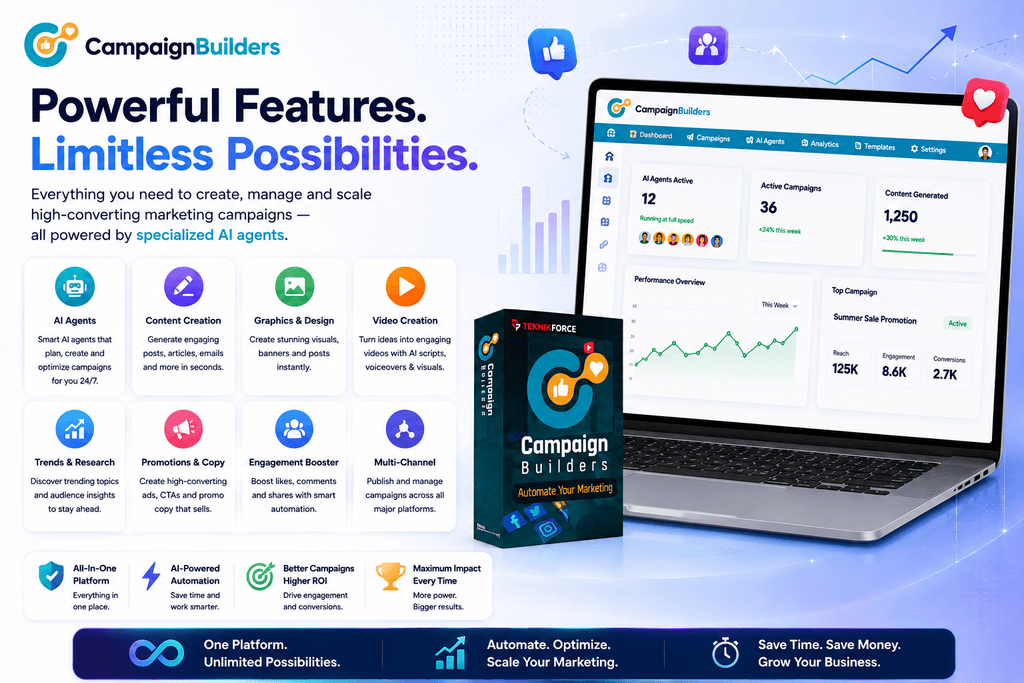
CampaignBuilders is built around one main idea: marketing works better when different tasks are handled by specialists instead of forcing one general AI tool to do everything.
That is what makes CampaignBuilders features more interesting than a standard list of writing, image, or video tools.
The platform uses multiple AI marketing agents, each with a specific role. One can focus on brand direction, another can research trends, another can create promotions, while others handle graphics, memes, long-form content, engagement, or video.
In simple terms, CampaignBuilders is designed to feel more like a small AI marketing team than a single chatbot.
This page breaks down the main CampaignBuilders features, how the AI agents work, and where the platform may be most useful.
CampaignBuilders Features at a Glance
| Feature | What It Does |
|---|---|
| Multi-Agent AI System | Uses specialized AI agents for different marketing tasks |
| Brand Management | Helps maintain messaging, tone, and campaign direction |
| Trend Research | Identifies relevant trends and content opportunities |
| Promotional Content | Creates marketing messages, ads, and promotional copy |
| AI Graphics | Produces campaign visuals and social graphics |
| Meme Marketing | Creates niche-related meme content |
| Audience Engagement | Helps with responses and engagement-focused content |
| Long-Form Content | Produces articles and research-driven content |
| AI Video Creation | Creates reels, promotional videos, and video ads |
| Campaign Management | Organizes multiple marketing activities around campaigns |
1. Multi-Agent AI Marketing System
The most important CampaignBuilders feature is its multi-agent AI structure.
Most AI tools give you one assistant.
You ask it to write a post. Then you ask it to create an ad. After that, you ask it to act like a designer, strategist, or social media expert.
CampaignBuilders approaches the problem differently.
It separates marketing responsibilities among specialized agents.
This matters because marketing is not one job.
A campaign may need:
- strategy
- research
- copywriting
- design
- video
- trend analysis
- engagement
- promotion
CampaignBuilders tries to coordinate these different roles inside the same environment.
Here’s what most people don’t know: the hardest part of AI marketing is often not content generation. It is keeping everything connected.
A campaign can quickly become messy when the copy, graphics, videos, and promotions all feel like they were created independently.
The multi-agent approach is designed to reduce that problem.
2. Brand Manager
The Brand Manager focuses on campaign direction and consistency.
Its role can include:
- brand positioning
- tone of voice
- campaign messaging
- communication guidelines
- strategic direction
Think of it as the person who keeps asking:
“Does this still sound like our business?”
That may seem basic, but it becomes important when a large amount of content is being created.
Without consistent direction, AI-generated marketing can start to feel disconnected.
One post sounds professional. The next sounds overly casual. A third suddenly uses a completely different selling angle.
The Brand Manager helps create a clearer foundation for the rest of the campaign.
3. Trend Marketer
The Trend Marketer is designed to identify current topics and viral opportunities that may be relevant to a business.
This can be particularly useful for social media marketing.
Timing matters.
A good post published too late may perform far worse than a slightly simpler post published while interest is still high.
The Trend Marketer can help users find opportunities before creating content around them.
The key word here is relevance.
The biggest mistake people make is jumping on every popular trend regardless of whether it fits their audience.
A useful trend should support the brand rather than distract from it.
4. Promotions Expert
The Promotions Expert focuses on content designed to drive action.
It can help create:
- promotional posts
- advertising copy
- product promotions
- email marketing content
- campaign messaging
- multi-platform marketing scripts
This makes CampaignBuilders useful for more than simply filling a social media calendar.
There is a big difference between content that gets attention and content that moves someone toward an offer.
The Promotions Expert is built around that second goal.
5. AI Designer
The Designer handles visual campaign assets.
Possible uses include:
- social media graphics
- promotional images
- advertising banners
- campaign creatives
- branded visuals
For a solo entrepreneur, this can be especially useful.
Let me explain.
You write a promotional post. Then you open a separate design tool. You search for the right layout. You change fonts, resize the image, export it, and then return to your campaign.
Doing that once is not difficult.
Doing it every day becomes a workflow problem.
CampaignBuilders aims to bring more of that process together.
6. Meme Marketer
The Meme Marketer is one of the more unusual CampaignBuilders features.
It is designed to create niche-related memes that can be used for social engagement.
Memes are not suitable for every business.
A corporate consulting company and a gaming brand clearly communicate very differently.
But when the format matches the audience, memes can help a brand feel more natural, relatable, and current.
The important thing is to use them strategically rather than treating them as random entertainment.
7. Engagement Expert
Posting content is only one part of social marketing.
People comment.
They ask questions.
They react.
They want answers.
The Engagement Expert is designed to help with audience interaction and engagement-focused content.
This is a useful addition because many AI platforms focus almost entirely on creating posts and ignore what happens after publication.
Good engagement can turn passive followers into actual relationships.
That is often where trust starts to build.
8. Journalist
The Journalist handles longer-form and research-oriented content.
Potential uses include:
- articles
- informative posts
- research-based content
- PR-style material
- news-inspired content
This gives CampaignBuilders more range than a basic social media generator.
For example, a campaign might begin with a longer article and then use that central idea to create social posts, promotional graphics, and short videos.
That type of content repurposing can make a campaign more efficient.
9. Videographer
Video is now a major part of online marketing, especially on social platforms.
The Videographer is designed to help create:
- reels
- short-form videos
- promotional videos
- video advertisements
This allows CampaignBuilders to support multiple content formats inside the same broader campaign.
That is important because users do not consume every message in the same way.
Some prefer text.
Others respond better to graphics.
Many prefer short video.
A campaign that can adapt to several formats has more opportunities to reach the same audience.
10. Campaign-Based Workflow
Another important CampaignBuilders feature is the campaign-based structure itself.
Instead of creating random pieces of content, users can organize marketing activity around specific goals.
For example:
Campaign: Launch a new coaching program.
The campaign might involve:
- trend research
- promotional posts
- graphic creatives
- video content
- long-form educational content
- engagement posts
- follow-up messaging
That is much more useful than simply generating ten unrelated posts.
It creates context.
And context is what makes individual marketing assets feel like part of a real campaign.
11. Multiple Campaign Capacity
CampaignBuilders supports multiple campaigns depending on the plan.
The Elite version currently supports up to 4 campaigns, while Pro increases this to 30 campaigns.
That difference becomes important for:
- agencies
- freelancers
- marketers managing several brands
- businesses running multiple promotions
- users handling seasonal campaigns
A small business may only need a few active campaigns.
An agency could reach that limit quickly.
12. Commercial Use With CampaignBuilders Pro
CampaignBuilders Pro adds commercial rights, which makes it more useful for people providing services to clients.
This can be valuable for:
- social media managers
- marketing freelancers
- consultants
- agencies
- campaign creators
Instead of using CampaignBuilders only for your own business, Pro can support a service-based workflow.
That changes the software from a personal productivity tool into something that may also contribute to client delivery.
Who Will Benefit Most From CampaignBuilders Features?
CampaignBuilders is likely to be most useful for people who currently spend too much time switching between marketing tools.
It may be a good fit for:
- solo entrepreneurs
- affiliate marketers
- small businesses
- freelancers
- agencies
- coaches
- ecommerce marketers
- social media managers
- content creators
To be honest, someone who only needs an occasional AI-written paragraph probably does not need this type of platform.
CampaignBuilders makes more sense when marketing involves several moving parts.
Final Thoughts on CampaignBuilders Features
The strongest CampaignBuilders feature is not any single AI tool.
It is the way the platform divides marketing work among specialized agents.
The Brand Manager handles direction.
The Trend Marketer looks for opportunities.
The Promotions Expert focuses on selling.
The Designer creates visuals.
The Meme Marketer works on social-style content.
The Engagement Expert supports interaction.
The Journalist creates longer-form material.
And the Videographer brings campaigns into video.
Individually, many of these tasks can already be done with separate AI tools.
The difference is that CampaignBuilders is designed to bring them into a more coordinated campaign workflow.
For solo marketers, that can reduce tool switching.
For freelancers and agencies, it can help manage more campaigns from one system.
And for businesses trying to maintain a consistent presence across text, graphics, video, and social channels, that connected approach may be the most valuable feature of all.